Switching property management software in Ireland: a 2026 migration guide
allen
June 14, 2026
11 min read
Key takeaways
Switching property management software in Ireland is mostly a data and timing exercise. Plan the migration around your RTB renewal dates and rent-collection cycle so nothing lapses mid-move. Start from a clear view of which platform actually fits your portfolio.
The data that must move cleanly: tenancy records, rent ledgers, tenant contacts, RTB registration status, maintenance history, and open documents. Export everything before you cancel anything.
Run both systems in parallel for one full rent cycle. Do not cancel the old platform until the first collection on the new one has reconciled.
Ask any vendor four questions up front: will they import your data, is there a charge, how long does it take, and what happens to in-flight payments and direct debit mandates.
The best time to switch is between rent cycles and well clear of an RTB renewal deadline, not in the middle of either.
Most landlords do not put off switching property management software because they are happy with what they have. They put it off because the move itself feels risky. What happens to the rent that is mid-collection? Will the tenancy data survive the export? What if an RTB deadline falls during the changeover? Those are reasonable worries, and they are exactly why a switch needs a plan rather than a leap.
The good news is that a migration is a known quantity. The data that needs to move is finite, the order of operations is predictable, and the risky moments (rent runs, direct debit mandates, RTB renewals) are all things you can schedule around. Done in the right sequence, the changeover is invisible to your tenants and leaves you with a cleaner record than you started with.
This guide covers what to move, the order to move it in, how to avoid losing data, and the four questions that separate a smooth migration from a painful one. It is written for Irish portfolios specifically, where the RTB and rent-cap rules add steps a generic guide will skip.
When switching property management software is actually worth it
A switch is worth the effort when your current tool is creating work rather than removing it. The clearest signal in the Irish market is compliance: if you are tracking RTB registration deadlines in a separate calendar, calculating permissible rent increases by hand, or reconciling rent against a bank statement in a spreadsheet, your software is not doing the job it should. Those are not edge cases. They are the core of managing a tenancy in Ireland, and a platform that leaves them to you is a platform you have outgrown.
The other common trigger is scale. A tool that was fine for three properties becomes a liability at fifteen, when missed deadlines stop being rare and start being statistical. If you are weighing options, our guide to the best property management software for Irish landlords walks through which tier fits which portfolio size, so you switch to the right thing once rather than the wrong thing twice.
What data actually has to move
The single biggest source of migration anxiety is the fear that something will be left behind. It helps to see the full list up front, because it is shorter and more concrete than most people expect. Everything in a property management system falls into one of these buckets:
Tenancy records: property addresses, tenant names, lease start and end dates, rent amounts, deposit details.
Rent ledgers: the full history of what was due, what was paid, and the running balance per tenancy. This is the record you cannot afford to lose.
Tenant contacts: phone numbers, email addresses, and any communication preferences.
RTB registration status: which tenancies are registered, registration dates, and renewal due dates.
Maintenance history: past requests, contractor assignments, resolutions, and any photo documentation that forms an audit trail.
Documents: signed leases, BER certificates, gas safety records, deposit protection paperwork, and correspondence.
Financial transactions: the reconciled payment history you will need at tax time.
Export every one of these from your current system before you touch the new one. Most platforms let you export to CSV or PDF; if yours does not, that difficulty of getting your own data out is itself a reason to leave.
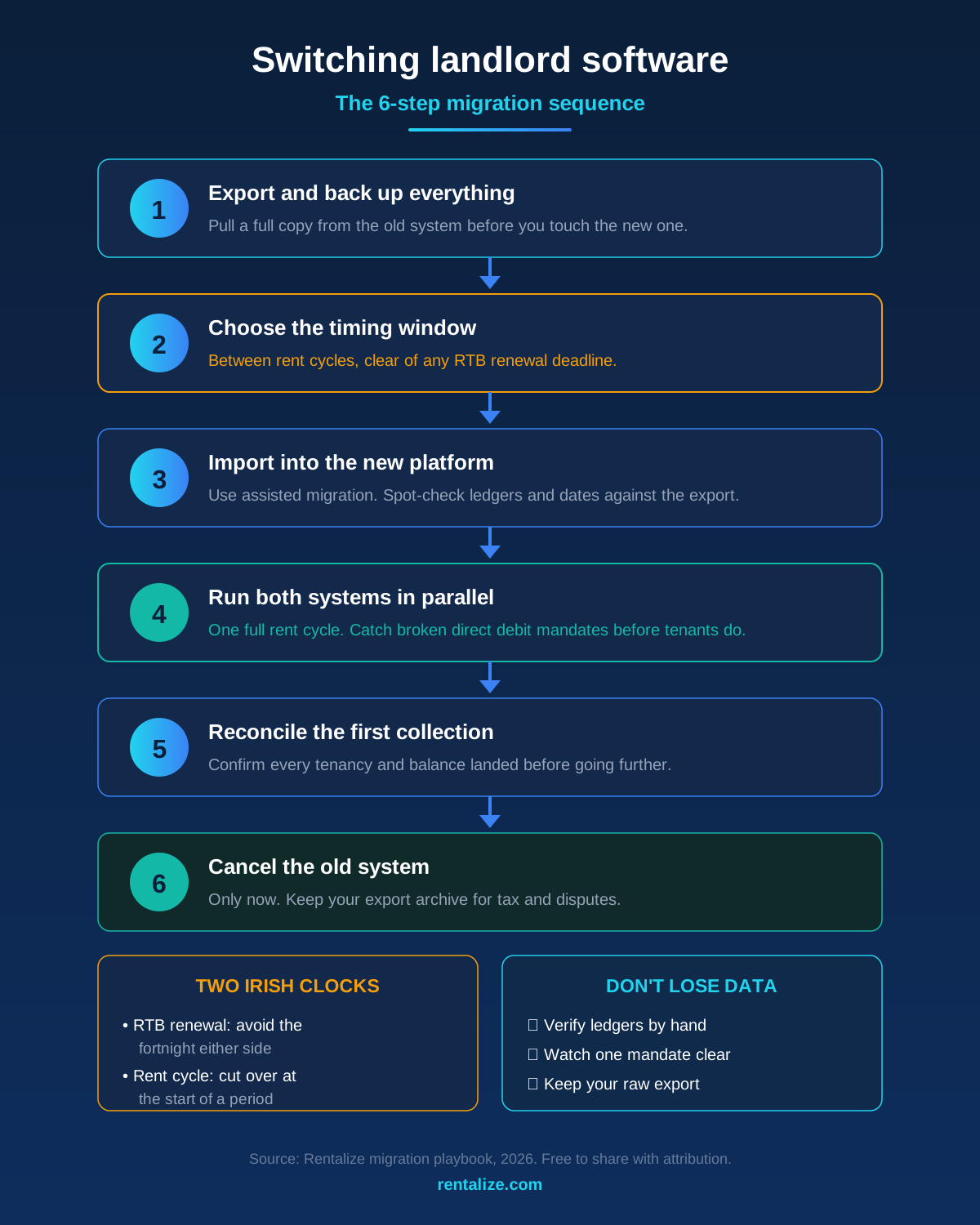
Source: Rentalize migration playbook, 2026. Free to share with attribution.
The migration sequence, step by step
Order matters more than speed. A migration done in the wrong sequence is where data goes missing and payments fall through cracks. This is the order that keeps both systems safe until the new one has proven itself.
Step 1: Export and back up everything from the old system
Before you create a single record in the new platform, pull a complete export from the old one and store it somewhere independent. This is your safety net. Even with assisted migration, you want a raw copy of your own data that does not depend on either vendor.
Step 2: Choose the timing window
Pick a window that sits between rent cycles and at least a few weeks clear of any RTB renewal deadline. The worst time to switch is the week rent is due or the week a registration lapses. Mapping your renewal dates first tells you when the safe window actually is.
Step 3: Import into the new platform
Load tenancy records, ledgers, contacts, and RTB status into the new system, ideally with the vendor’s structured import tool or assisted migration. Check a sample of tenancies by hand against your export to confirm balances and dates carried over correctly.
Step 4: Run both systems in parallel for one rent cycle
Do not cancel anything yet. Set up rent collection on the new platform and let one full cycle run while the old system stays live as a reference. This is the step that catches mismatched balances and broken direct debit mandates before they become a tenant-facing problem.
Step 5: Reconcile, then cancel the old system
Once the first collection on the new platform has landed and reconciled against your ledgers, and you have confirmed every tenancy transferred, you can cancel the old subscription. Keep your export archive regardless, for tax and dispute purposes.
How to switch without losing data
The phrase “without losing data” usually points at three specific risks: a botched ledger import, broken payment mandates, and an RTB gap. Each has a simple guard.
For the ledger, the guard is verification. After import, spot-check the running balance on a handful of tenancies against your old export. A balance that is off by a month usually means the import mapped a field wrong, and it is far easier to fix on day one than at year end. For payments, the guard is the parallel run: a direct debit mandate does not always transfer between providers, and the only reliable way to know each tenant’s mandate is live on the new system is to watch a real collection clear. For the RTB, the guard is timing, which the next section covers.
Rent collection deserves particular attention because it is the part tenants notice. Platforms that use open banking and direct debit generally make this cleaner, because the mandate and the reconciliation live in the same system rather than being stitched together from a bank feed and a spreadsheet.
Timing the switch around RTB and rent cycles
Ireland adds two clocks to a migration that a generic guide will not mention: the RTB renewal cycle and the rent-cap calendar. A switch that ignores them can create a compliance gap even when the data moves perfectly.
RTB registration renews annually, so before you set a migration date, list every tenancy’s renewal due date and avoid the fortnight either side of one. If a renewal is genuinely imminent, file it on the old system first, confirm it, then migrate. Carrying a clean, current registration status into the new platform is far simpler than trying to file mid-move. A tool with native RTB registration tracking makes this easier on the far side, because it surfaces the next renewal the moment your data lands.
The rent cycle is the second clock. Schedule the cutover so the new system handles a full collection from the start of a period rather than picking up halfway through one. That keeps each tenancy’s ledger clean and avoids a split month that is awkward to reconcile and confusing for tenants. If a rent review is also due, settle where each tenancy sits against the 2% RPZ cap before you move, so the new platform inherits the correct figures.
Four questions to ask before you commit to a new platform
Will you import my existing data, and is there a charge? Assisted migration saves hours, but ask whether it is included or a paid add-on, and which data types are covered.
How long does the migration take end to end? A realistic answer is days to a couple of weeks for a mid-size portfolio. A vendor who cannot give a timeline has not done many.
What happens to in-flight payments and direct debit mandates? Confirm whether tenants need to re-authorise mandates and how mid-cycle payments are handled, so nothing is collected twice or missed.
Can I export my data again later? You are switching because the last tool made leaving hard. Make sure the new one will not. Confirm you can pull a full export whenever you want.
How Rentalize handles migration and onboarding
Rentalize treats the switch as part of onboarding rather than a problem you solve alone. The implementation and data migration process covers structured import of tenancy records, rent ledgers, tenant contacts, and RTB status, with a verification pass so balances and registration dates are checked rather than assumed. Because RTB tracking, RPZ calculations, and open banking rent collection are built in, the data lands in a system that immediately surfaces your next renewal and reconciles your first collection automatically.
For larger moves, Rentalize Core supports portfolio and letting-agent migrations with multi-owner records intact, and property management companies can bring client data across without rebuilding it tenancy by tenancy. Smaller landlords moving off a spreadsheet can start on the Rentalize 360 app and import as they go.
How do I switch property management software without losing data?
Export a complete backup from your old system first, then import tenancy records, rent ledgers, contacts, and RTB status into the new one, ideally with the vendor’s assisted migration. Verify a sample of ledgers by hand, run both systems in parallel for one full rent cycle, and only cancel the old platform after the first collection on the new one has reconciled.
What data do I need to migrate when changing landlord software in Ireland?
Tenancy records, rent ledgers, tenant contact details, RTB registration status and renewal dates, maintenance history, stored documents (leases, BER and gas safety certs, deposit paperwork), and reconciled financial transactions. The rent ledger and RTB status are the two you most need to verify after import.
When is the best time to switch platforms?
Between rent cycles and at least a couple of weeks clear of any RTB renewal deadline. Avoid switching the week rent is due or when a registration is about to lapse. If a renewal is imminent, file it on the old system first, then migrate with a clean status.
Will my tenants need to set up their direct debits again?
Sometimes. Direct debit mandates do not always transfer between providers, so confirm with the new vendor whether tenants must re-authorise. Running one rent cycle in parallel is the reliable way to confirm each mandate is live before you rely on it.
How long does migrating property management software take?
For a small portfolio it can be a few days; for a mid-size portfolio with assisted migration, expect up to a couple of weeks including the parallel rent cycle. A vendor who cannot give you a clear timeline probably has not run many migrations.
Is there usually a charge to import my data?
It varies. Some platforms include assisted migration in onboarding; others charge for implementation and data migration, sometimes several hundred to a couple of thousand euro. Ask before you sign, and confirm which data types the import covers.
Key takeaways Making Tax Digital for Income Tax has applied since April 2026 to qualifying income above 50,000 pounds. From April 2027 the threshold...
Migration guide for Irish AHBs moving from spreadsheet stacks to integrated housing platforms. The 14-week phased approach, the data pitfalls, the change management, and...
GO DEEPER
Helpful Tools and Guides
Free calculators and in-depth guides to Irish housing schemes.
📊
Cost Rental Feasibility Calculator
Go or no-go viability for AHBs, the LDA and councils, across STAR, CREL and the AHF.

 Software Selection